
How To Transpose Ukulele Chords To Any Key
 by Jonas
Need a song in a different key? Here is how to transpose ukulele chords into any key, so you can sing in your range or swap tricky chords for easy ones.
“Transposing” is one of those words that sounds like it belongs in a music theory exam. It doesn’t. Strip away the fancy name and it’s just counting steps, the same way you’d count squares on a board game. You shift every chord in a song up or down by the same amount and the song moves into a new key (= a new home pitch) that fits you better.
When I started out I leaned on a capo for almost everything because clipping it on felt easier than thinking about keys. Once transposing clicked I could move any song into a friendlier key in my head. That’s the little freedom I want to hand you here.
Why transpose in the first place?
Why would you bother? There are three everyday reasons you’ll reach for this.
1. If you’re straining for the high notes or mumbling the low ones, you can move the key until the song sits in your comfortable middle. No more croaking through the chorus.
2. Then there are the chords themselves. Some keys are kind to ukulele players and some really are not. Shifting the key can turn a finger-twisting chart into a handful of friendly open shapes.
3. And finally there’s playing with other people. Jamming with a guitarist, a singer or a backing track? Transpose so everyone lands in the same key and nobody’s wincing.
The twelve-note ladder you need
Every transposition rides on one simple idea. There are twelve notes in music and they repeat, like stepping up a staircase that loops back to the bottom once you reach the top. Here they are in order, each step up being one semitone (= the smallest gap between two notes):
C – C# – D – D# – E – F – F# – G – G# – A – A# – B and then back round to C.
A few notes wear two names. C# is the same pitch as Db, D# is the same as Eb and so on. Same note, two spellings. Do not let that throw you, it trips up loads of beginners and means nothing scary.
To transpose, you pick how many steps you want to move, then move every chord in the song by that same number of steps. The chord quality stays put. A minor stays minor, a 7th stays a 7th. Only the letter changes.
Method 1: move every chord by the same number of semitones
Let me show you with a real progression. Here’s a common one in the key of C:
Moving from C to A (down 3 semitones). Count down the ladder three steps from each chord:
- C down 3 lands on A
- F down 3 lands on D
- G down 3 lands on E
- Am down 3 lands on F#m (the “m” comes along for the ride)
So the same song in A looks like this:
Moving from C to D (up 2 semitones). Same song again, this time shifted up two steps:
- C up 2 lands on D
- F up 2 lands on G
- G up 2 lands on A
- Am up 2 lands on Bm
Which gives you:
Notice the pattern is identical every single time. Count the steps once, then apply the same count to all the chords. That’s the whole trick, honestly.
The quick checklist
- Write down the chords in the song.
- Decide your new key, then count the semitones from the old key to the new one on the ladder.
- Move every chord up or down by that same number of semitones.
- Keep each chord’s quality (minor, 7th, sus and so on) exactly as it was.
- Play it through and check it sits well for your voice.
If a chord lands on a note with two names, just pick whichever spelling you find easier to read. Not sure what you ended up with? The chord namer tool will tell you the name of any shape you’re fingering.
Method 2: the quick capo route
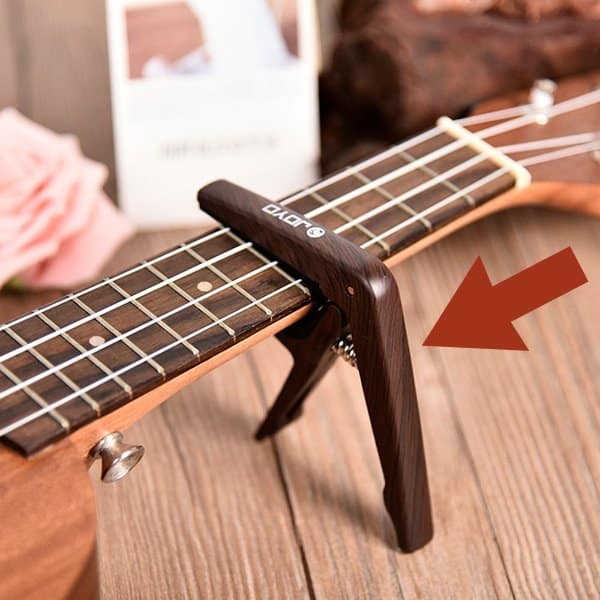
Don’t fancy any math at all? A capo transposes for you and this is exactly how I got started. Clip it on the first fret and every chord you play sounds one semitone higher, the second fret two semitones higher and so on. You keep playing the easy open shapes you already know while the song quietly moves into a new key.
It’s the lazy genius option for raising a song to fit your voice. The catch is that a capo only goes up, never down, and it eats a little of your fretboard. There’s nothing wrong with leaning on one while you find your feet, but I’d nudge you to learn Method 1 too, so you’re not stuck when there’s no capo in your case.
Method 3: change key to get easier shapes
Sometimes the point of transposing isn’t your voice at all. It’s your fingers. If a song is stuffed with barre chords or awkward stretches, try transposing it into a friendlier key instead of fighting the chart.
Ukulele-friendly keys like C, G, F and A tend to hand you lots of open shapes such as:
Compare that with a key full of flats that drags you into barres all over the neck. Same song, wildly different difficulty. So before you give up on a tune, ask yourself whether a different key would hand you nicer chords.
If you’d rather keep the original key but tame one or two stubborn chords, I’ve got a separate guide for that: 5 quick tips to simplify difficult ukulele chords.
A word on keys and how they fit together
Transposing clicks even faster once you understand why certain chords live together in the first place. Think of a key like a family at a dinner table. The chords in a song aren’t random guests, they belong to that family. When you move the key, the whole family gets up and moves to a new table together.
If you want to go deeper into which chords belong to which key and how that helps with songwriting and picking a good key to start in, have a read of my ukulele keys and songwriting guide.
The easiest route: transpose right on the song page
When you are using UkuTabs to play songs, you don’t have to count anything at all, because every single one has a transposer built right in. Look for the transpose selector next to the chord sheet and pick a number, anywhere from +6 down to -6. Choose +2 and the whole song jumps up two semitones, chords and all. Choose -3 and it drops three steps. Zero always puts you back in the original key.
It does everything from Method 1 for you in one click and it remembers your choice (when logged in), so the song opens in your key the next time you visit. If you mostly play from UkuTabs song pages, this really is all you need. Learning the by-hand method still pays off for the times you’re away from the site, reading a chord sheet on paper or working a song out by ear.
Handy tools for transposing
A few other UkuTabs tools make this even smoother:
- The chord diagrams tool to see any new shape you land on.
- The chord namer to name a shape when you’re not sure what it is.
- The tuner so you’re always transposing from properly tuned strings.
Wrapping up
Transposing looks like wizardry from the outside, but it’s really just counting steps on a twelve-note ladder and moving every chord the same distance. Once it clicks you’ll reach for it all the time, whether you’re saving your voice, dodging a nasty barre chord or jamming along with a friend.
Are you also keen to know which chords naturally belong together so you can pick the perfect key from the start? Have a look at my ukulele keys and songwriting guide.
I hope this guide has helped you feel confident changing the key of any song. Try it on a tune you already know, shift it up two and down three and hear how it stays the same song in a new home. Feel free to contact me whenever you need more information about transposing your chords. Have fun with it!