UkuTabs Songs 2.0: An Interactive Ukulele Course in the App
 by Jonas
UkuTabs Songs 2.0 adds an interactive ukulele course to the Learn tab: 8 chapters, 57 short lessons, a band to play with and a real song at the end of every chapter. Every song stays free to read.
Just picked up a ukulele and want to learn it from your phone? Or do you know a few chords already and want to finally get through a whole song? Then this update is for you.
The songs are still the heart of UkuTabs. All 23,000+ of them stay free to read and new ones are added daily. What’s new in 2.0 is everything that helps you learn to play them.
What’s in the UkuTabs ukulele course?
The UkuTabs ukulele course has 8 chapters and 57 short lessons. You find it in the Learn tab of the app. Each lesson shows you one new thing and then you play it with the band. It starts at the very beginning (how to hold your ukulele and how to tune it) and by the last chapter you’re making a song your own.
| Chapter | What you learn | Lessons | Access |
|---|---|---|---|
| 1. First chords, first song | Hold it, tune it, five chords (C, Am, F, G and G7) and your first song with the record | 9 | Free |
| 2. Keep the beat | Counting, down-up strumming, the island strum and changing chords without stopping | 8 | Free |
| 3. Smooth changes, whole songs | Faster changes, the fingers that can stay put, F to G and reading a song sheet | 7 | Free |
| 4. Dm, Em and E7 | Three new chords, major against minor and a swing feel | 8 | UkuTabs+ |
| 5. New keys: D and the capo | The D chord, the key of G and how a capo works | 5 | UkuTabs+ |
| 6. Rhythm and groove | Three beats to the bar, accents, the muted chnk and offbeat strums | 6 | UkuTabs+ |
| 7. Bigger chords | A, F#m, your first Bb barre and a way through the E chord | 7 | UkuTabs+ |
| 8. Make it yours | Hearing the chords, moving a song to another key and playing your own version | 7 | UkuTabs+ |
That makes 24 free lessons before you need UkuTabs+ at all.
Play with the band, then with the record
In every lesson you play along with a band. It keeps time while you play the chords, it shows you which chord is coming next and you can make it slower or faster until the change feels easy.
Every chapter ends with one real song that you play along with the original recording. I count you in, the record starts and the chords glide past while you play. (The records play through YouTube, so you need a connection for that part.)

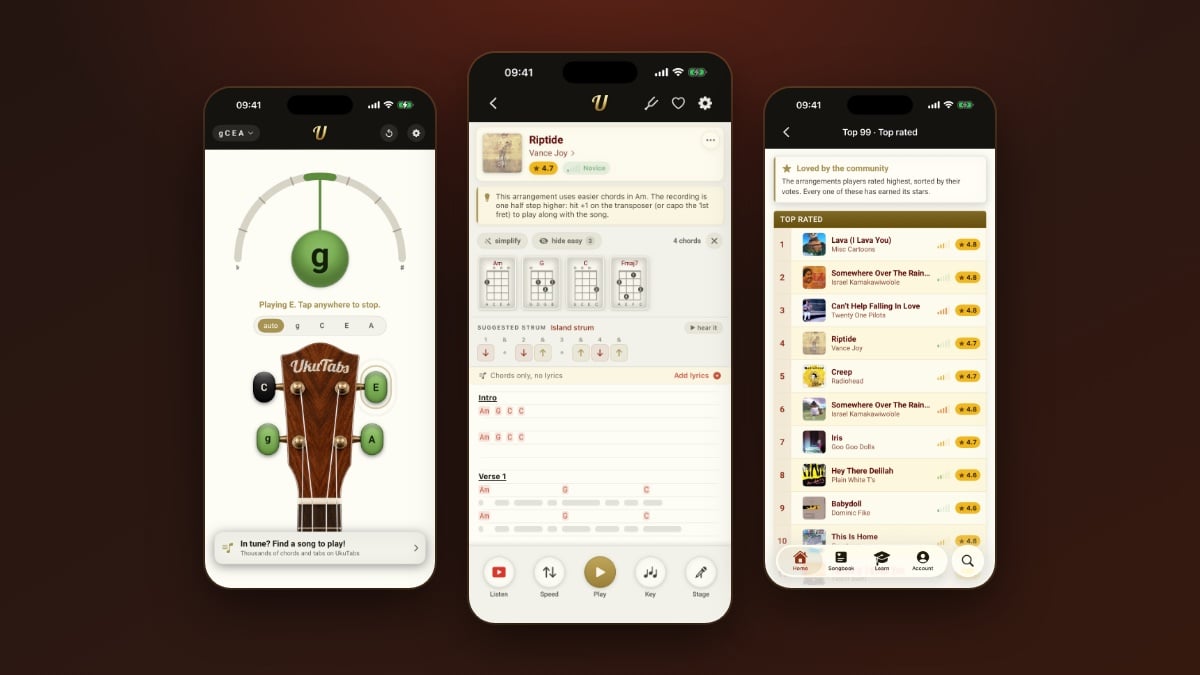
The band and the records are part of the course. The song pages stay the way you know them, with a diagram for every chord and a strum you can hear before you play it.
More ways to practice
Around the lessons there’s a whole set of tools to help it stick:
- Copy my strum: I play a strum and you build it stroke by stroke
- Practice games for faster chord changes, for your ears (“Which chord is it?” and “Changed or same?”) and for your rhythm
- A guided tuner that listens to one string at a time and tells you which way to turn the peg
- A daily streak with one rest day a week, a week card and your stats, all kept on your device
- Already play a little? Pick the chords you know and skip ahead
- Left-handed mode mirrors the photos and the chord diagrams
The guides moved into the Library
All 43 UkuTabs guides are still free and they now live in the Library inside Learn. Tuning, chords, strumming, fingerpicking, theory and care, all in one place, with a search and a filter by topic. They’re built into the app, so they work offline. The same guides are on the website too, starting with how to play ukulele.

Other improvements
- Remove a song from your Songbook with a swipe or a long press, with Undo if you change your mind
- New phone or a restore? The Songbook offers to download your saved songs again
- Songs show right away on a fresh install and open more smoothly
- Monthly subscribers can switch to yearly in Account
- Account shows what’s kept on your device and removes it in one go
- Signed in with your UkuTabs account, UkuTabs+ follows you to ukutabs.com and your other devices. Google Play purchases now link to your account too
- Delete account removes your whole UkuTabs account, comments included
- Hide a comment for yourself or report it
- Better layouts on iPhone Duo
What’s free and what’s in UkuTabs+?
In UkuTabs Songs 2.0 these are free, with no ads and no sign-up: every song, chapters 1 to 3 of the course, the practice inside those lessons, the guided tuner and all 43 guides.
UkuTabs+ adds chapters 4 to 8, all the Practice modes and the playing tools: hands-free autoscroll, Stage mode for playing live, transpose to any key, the full tuner, songs saved for offline and unlimited favorites. The app shows you the price for your country before you buy.


Looking for the free tuner app too? Have a look at the UkuTabs apps for both of them side by side.
Frequently asked questions
Is the UkuTabs ukulele course free?
The first three chapters of the UkuTabs ukulele course are free: 24 lessons that take you from your first chords to whole songs. Chapters 4 to 8 are part of UkuTabs+. Every song in the app stays free to read either way.
Can I play with the band on any song?
No, the band and the original records are only in the course lessons. On the song pages you get the chord diagrams and a suggested strum that you can hear on that song’s own chords.
I already play a little. Do I have to start at chapter 1?
No, you don’t have to start at chapter 1. Pick the chords you already know and the course lets you skip ahead.
Which devices does UkuTabs Songs 2.0 work on?
UkuTabs Songs 2.0 works on iPhone, iPad, iPhone Duo and Android phones. Signed in with your UkuTabs account, UkuTabs+ follows you to ukutabs.com and your other devices.
Do I need an account for the UkuTabs course?
No, you don’t need an account. You can read every song and take the free chapters without signing up. An account is only handy if you want UkuTabs+ on more than one device or on the website.
Where did the guides go in the app?
The guides are in the Library inside the Learn tab, all 43 of them and still free. You’ll find the same guides on the website under learn how to play ukulele.
If something in a lesson isn’t clear or you’re missing something, let me know. Grab your ukulele and play something!