
UkuTabs Apps for iPhone and Android: Songs, a Ukulele Course and a Free Tuner
 by Jonas
UkuTabs has two apps on iPhone and Android: the songs app with 23,000+ free songs and an interactive ukulele course plus a free tuner with no ads. Here's what each one does and what's free.
Updated in November 2026 for UkuTabs Songs 2.0.
Looking for a UkuTabs app for your phone? There are two: one for playing songs and learning to play and one for tuning. Both are native apps, built for iPhone and for Android, so they feel at home on your phone.
Does UkuTabs have an app?
Yes, UkuTabs has two apps for iPhone and Android. Both are free to download on the App Store and Google Play and they do different jobs:
| App | What it’s for | What’s free | Devices |
|---|---|---|---|
| UkuTabs Ukulele Chords & Songs | Playing songs and learning to play | Every song, chapters 1 to 3 of the course, the guided tuner and 43 guides | iPhone, iPad, iPhone Duo and Android |
| UkuTabs Ukulele Tuner | Tuning your ukulele | Everything, forever | iPhone and Android |
What can you do in the UkuTabs songs app?
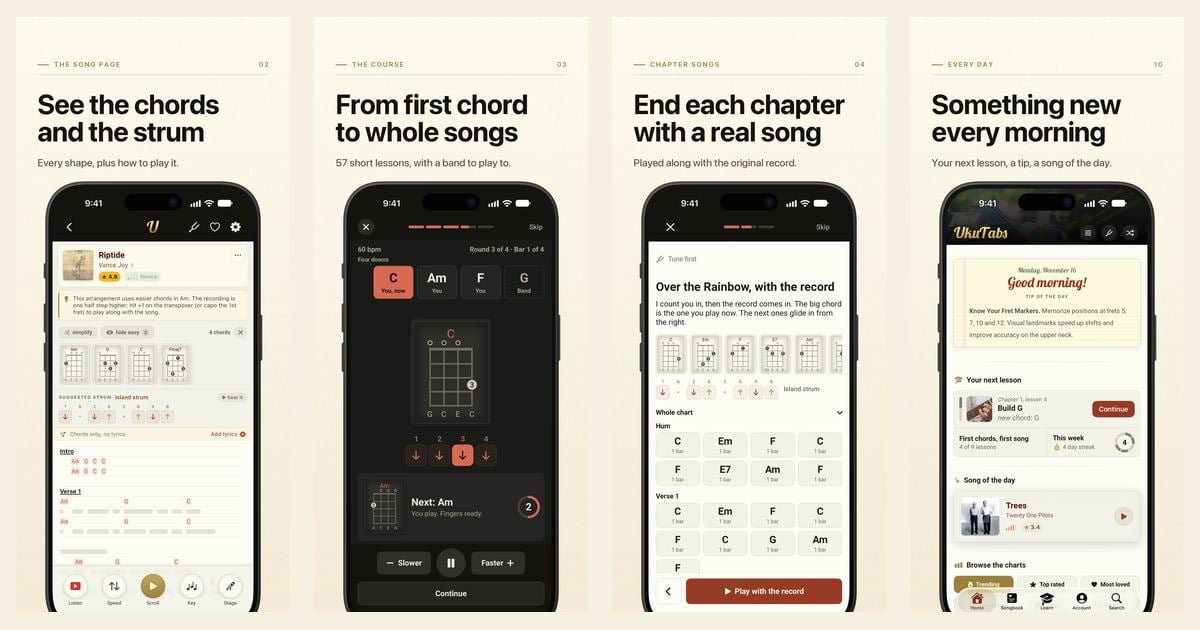
UkuTabs Ukulele Chords & Songs is the whole UkuTabs songbook in an app built for playing, now with an interactive course to learn from. Free, with no ads and no sign-up, you get:
- The chords for any of the 23,000+ songs, in full
- A finger-by-finger diagram for every chord. Tap one to hear it strummed
- A suggested strumming pattern with a hear-it button that plays it on that song’s own chords
- A How to play note with the song’s groove and, where known, its tempo and key
- Browse by difficulty, by how many chords a song needs or through every artist A to Z, plus the charts and a song of the day
- A Library of 43 guides, from tuning your first ukulele to strumming, fingerpicking, theory and care. They’re built into the app, so they work offline
- Turn your phone sideways on a song page for a wider view
- Dark mode, bigger text and left-handed chord shapes
- Up to 5 favorites
New songs are added daily, so the catalog keeps growing.

Does the UkuTabs app have a ukulele course?
Yes. Since version 2.0 the Learn tab of the UkuTabs songs app has an interactive ukulele course: 8 chapters and 57 short lessons, from holding and tuning your ukulele to playing a song your own way. In every lesson you play along with a band that keeps time while you play the chords and every chapter ends with one real song, played along with the original recording.
Around the lessons there’s a guided tuner that tells you which way to turn each peg, Copy my strum (I play a strum and you build it stroke by stroke), practice games for chord changes, your ears and your rhythm and a daily streak with one rest day a week. Already play a little? Pick the chords you know and skip ahead.

The band and the records are only in the course lessons. For the full chapter list, have a look at the ukulele course in UkuTabs Songs 2.0.


Is the UkuTabs app free?
Yes, the UkuTabs app is free to download and every song in it is free to read, with no ads and no sign-up. So are chapters 1 to 3 of the course (24 lessons), the guided tuner and all 43 guides. The tuner app is completely free.
UkuTabs+ is the optional upgrade inside the songs app. The songbook stays free.
What does UkuTabs+ include?
UkuTabs+ adds the rest of the course and the tools for playing:
- Chapters 4 to 8 of the course and all the Practice modes
- Hands-free autoscroll, so both hands stay on the ukulele
- Stage mode, a clean full-screen view for playing live
- One-tap transpose to any key, with simpler chords when you want them
- The full tuner inside the app
- Play along with the music video on song pages, where one is available
- Your own chord colors and shapes
- Songs saved for offline and unlimited favorites
You can take it monthly, yearly or once for life. Prices differ per country and the app shows your price before you pay. Signed in with your UkuTabs account, UkuTabs+ follows you to ukutabs.com and your other devices.
Does the UkuTabs iPhone app show lyrics?
No, the UkuTabs app for iPhone and iPad shows the chords without the lyrics. The chords, the diagrams and the song structure are all there. Want the words there too? Paste your own lyrics once and the app lines them up under the chords. They stay on your device. On Android the app shows the chords over the lyrics.
What does the UkuTabs tuner app do?
UkuTabs Ukulele Tuner is a free tuner app for iPhone and Android. It’s the tuner from the site, rebuilt as an app with the same pitch-detection engine as the web tuner.

- It works out which string you’re playing on its own, so you just play and it follows you
- Nine tunings plus a chromatic mode: standard gCEA, low-G, baritone, English D (also full step up), Canadian low-A, half step up, half step down, full step down and mandolin or violin
- Fitting a new string? Pick that string and it guides you straight to it, however far off it starts
- Tap a peg on the headstock to hear the real note and tune by ear
- Left-handed and right-handed layouts, light or dark and a choice of app icons
- It follows your phone’s language
The tuner app has no ads, no account and no subscription and it collects no data. It works completely offline and the Android version doesn’t even ask for internet access. On iPhone it keeps working with the phone on silent, which the browser tuner can’t do.
Which UkuTabs app should you download?
Download UkuTabs Ukulele Chords & Songs if you want to learn to play or have your songs in your pocket. It has a guided tuner for the course too. Only need to get in tune? Take UkuTabs Ukulele Tuner. It’s free and works offline. You can of course use both, since they do different jobs.
And if you’d rather stay in a browser, nothing changes. UkuTabs.com isn’t going anywhere and every song stays free there too.
Frequently asked questions
Do the UkuTabs apps work offline?
The tuner app works completely offline. In the songs app, the 43 guides work offline and saving songs for offline use is part of UkuTabs+. The chapter songs in the course play the original recording through YouTube, so those need a connection.
Is there a UkuTabs app for iPhone and iPad?
Yes. UkuTabs Ukulele Chords & Songs is on the App Store for iPhone and iPad and UkuTabs Ukulele Tuner is on the App Store for iPhone.
Is there an Android version of UkuTabs?
Yes. Both apps are native Android apps on Google Play: UkuTabs Ukulele Chords & Songs and UkuTabs Ukulele Tuner.
Does UkuTabs+ work on the website too?
Yes. Sign in to the app with your UkuTabs account and your UkuTabs+ follows you to ukutabs.com and your other devices, on iPhone and on Android.
Do I need an account to use the UkuTabs app?
No. You can read every song, take the free chapters of the course and use the tuner app without signing up. An account is only handy if you want UkuTabs+ on more than one device or on the website.
Do I still need the website?
No, you don’t need the website to use the apps, but it isn’t going anywhere. UkuTabs.com stays free and complete, with the web tuner, every song and all the guides.
I hope this helps you pick the right UkuTabs app. If something is missing or not working for you, feel free to contact me. Good luck and have fun!

That’s nice! Are you able to make a PC version of this app too?